
Auto-Reset Blocker3.1.0 - Get APK
You'll be able to download in few seconds.
Publisher Description
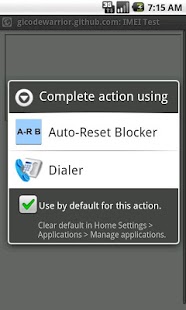
Certain versions of Android are currently vulnerable to a USSD attack. This application is intended to block USSD code execution from URLs.
http://gizmodo.com/5946334/samsung-security-bug-can-wipe-out-your-galaxy-phone-updating
The worst known exploit of this vulnerability will factory reset your phone without confirmation.
The vulnerability is NOT limited to Samsung phones. All Android phones running less than Android 4.1.1 are vulnerable until manufacturers/carriers release updates.
Phones known to have updates available include: Galaxy S3, Galaxy Nexus
Configure and verify it works for you:
1. Try this IMEI test: http://git.io/HtEU4Q
2. Check the box to make "Auto-Reset Blocker" the default action
3. Auto-Reset Blocker will block it and show you the malicious number
4. Dismiss the request
5. Open this safe telephone number test: http://git.io/3LZlrQ
6. Auto-Reset Blocker will show the safe number
7. Touch "Dial"
8. Your normal dialer will open with the safe number
If you have more than one dialer installed (besides this one), step 7 will first ask you which dialer to use.
If you check the box labelled "Auto-dial when safe", steps 5 and 6 are eliminated for your next safe number.
Once you make it through the above instructions, you are all set! If you are browsing the web on your phone and a website uses a malicious code, Auto-Reset Blocker will block it and warn you (just like the IMEI test). Tap the Dismiss button and go back to your browsing.
If you have a question or concern, please email me (android@gicode.net). I have no way to answer questions or otherwise communicate with you via reviews.
About Auto-Reset Blocker
The company that develops Auto-Reset Blocker is Rusty Burchfield. The latest version released by its developer is 3.1.0.
To install Auto-Reset Blocker on your Android device, just click the green Continue To App button above to start the installation process. The app is listed on our website since 2012-09-28 and was downloaded 0 times. We have already checked if the download link is safe, however for your own protection we recommend that you scan the downloaded app with your antivirus. Your antivirus may detect the Auto-Reset Blocker as malware as malware if the download link to net.gicode.android.autoresetblocker is broken.
How to install Auto-Reset Blocker on your Android device:
- Click on the Continue To App button on our website. This will redirect you to Google Play.
- Once the Auto-Reset Blocker is shown in the Google Play listing of your Android device, you can start its download and installation. Tap on the Install button located below the search bar and to the right of the app icon.
- A pop-up window with the permissions required by Auto-Reset Blocker will be shown. Click on Accept to continue the process.
- Auto-Reset Blocker will be downloaded onto your device, displaying a progress. Once the download completes, the installation will start and you'll get a notification after the installation is finished.
Program Details
System requirements
Download information
Pricing
Version History
version 3.1.0
posted on 2012-09-28
Several fixes and updates
version 3.1.0
posted on 2012-09-28
Changes since 3.0.0:,* Added scrolling for landscape on small screens,* Fixed crash on rotate while viewing safe number,* Improved Dial/Auto-dial functionality on Android 4.x,Changes between 2.0.0 and 3.0.0:,* Improved UI,* Added explicit copy button,* Added explicit dismiss button,* Recognize empty telephone numbers as safe,Changes between 1.0.0 and 2.0.0:,* New UI,* If only one dialer is installed (besides this one), the dialog is skipped,* Auto-dial when safe, is a preference now
Disclaimer
External Download
We do not host Auto-Reset Blocker on our servers. We did not scan it for viruses, adware, spyware or other type of malware. This app is hosted by Galad and passed their terms and conditions to be listed there. We recommend caution when installing it.
The APK Download link for Auto-Reset Blocker is provided to you by apps112.com without any warranties, representations or guarantees of any kind, so access it at your own risk.
If you have questions regarding this particular app contact the publisher directly. For questions about the functionalities of apps112.com contact us.
